pinterest pin maker

Pinterest Pin Maker for Vertical Graphics That Get Saved

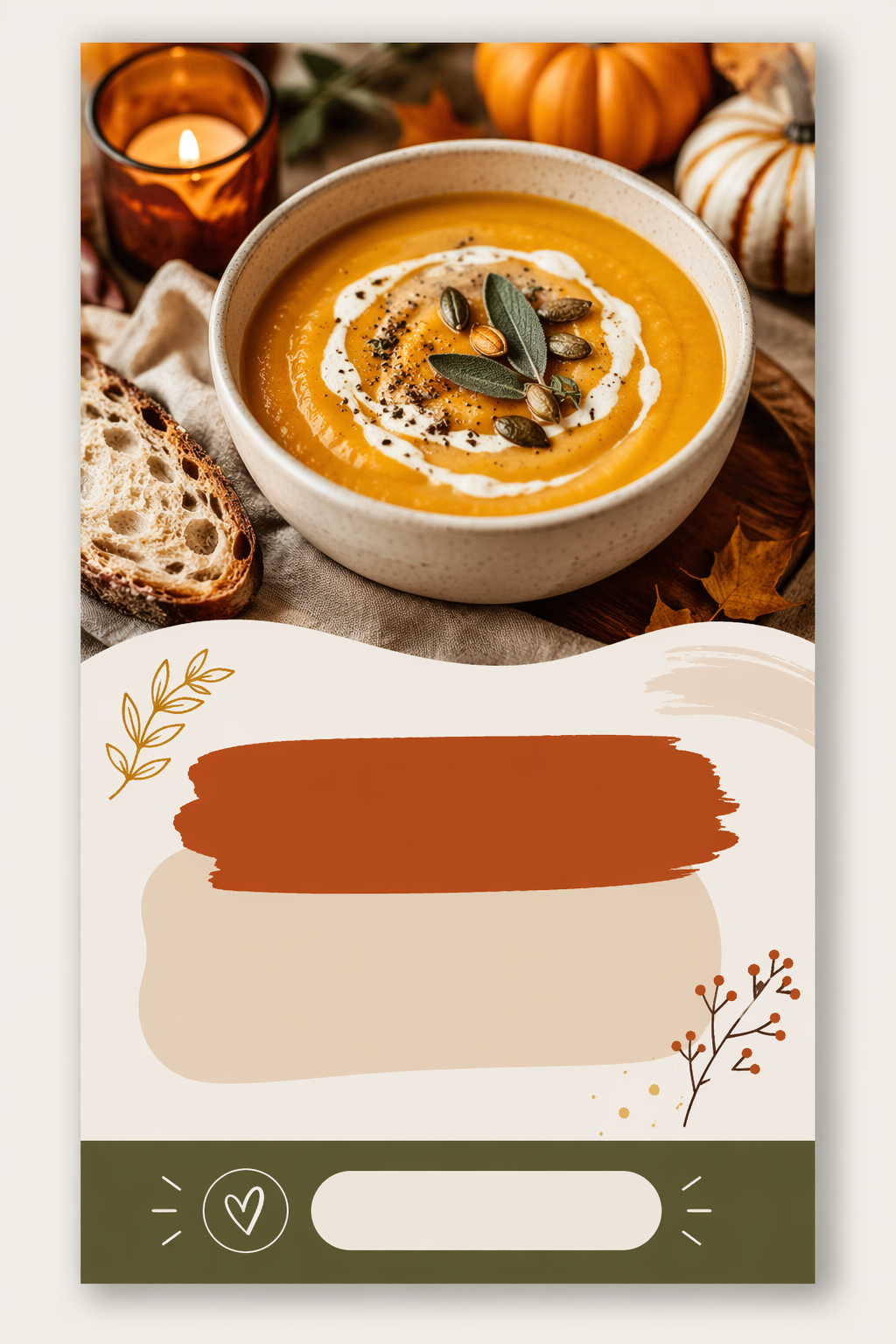
Generate tall 2:3 pin graphics with image, title space and CTA band — the format above came from one prompt, ready for your text overlay.

pinterest pin maker ai pinterest pin maker free ai pinterest pin maker pinterest pin design generator pinterest graphic maker online idea pin template generator vertical pin image creator
Pinterest pin maker output — vertical recipe pin template with photo, title area and CTA band
pinterest pin maker workflow preview
Start from this search

How to use pinterest pin maker

Turn pinterest pin maker research into a reviewed creative brief, choose the right model route, and keep the generation path attached to your project before spending credits.

Generate vertical Pinterest pin graphics without a designer

Batch-create pin variations for the same blog post or product

Get the 2:3 layout right — image zone, title space, CTA band

Find a free pin graphic maker without a sign-up wall

Keep a consistent pin style across a whole board

pinterest pin maker workflow steps

  1. 1. Set the canvas first: prompt for a vertical 2:3 Pinterest pin layout, and name the zones — photo area, title space, CTA band.

  2. 2. Describe the niche visual: cozy autumn recipe, minimalist home office, spring capsule wardrobe.

  3. 3. Ask for "title text area without actual text" — AI-generated lettering looks off, your overlay won't.

  4. 4. Generate 3-4 variations in text to image for the same post — Pinterest rewards fresh pins pointing at the same URL.

  5. 5. Re-style the winner for other boards via image to image to keep one consistent brand look.

Render the first frame of this workflow in the AI Pin Maker studio — try it free, no account needed.

A different kind of "pin maker"

Quick disambiguation: this page is about Pinterest pin graphics — the tall images that fill Pinterest feeds. If you came looking for physical enamel pins, the custom pin maker is your page; the two worlds share a name and nothing else.

For Pinterest, the format is the strategy. Pins live or die on a 2:3 vertical canvas: a strong visual up top, clear title space in the middle, and a call-to-action band at the bottom. Describe exactly that in text to image — the sample above came from one prompt with no design tool involved — then add your text in any editor or right in your Pinterest scheduler.

Why generate instead of using template sites

Template libraries make your pins look like everyone else's pins, because everyone pulls from the same library. Generation flips that: every background is unique to you, while the layout stays on-format. The practical sweet spot — generate the visual layer, keep your title font and brand colors constant in the overlay. Boards built this way read as a brand, not a template account.

Made for

Bloggers spinning 4-5 fresh pins per post — Pinterest's algorithm treats each as new content for the same link.

Etsy and product sellers building seasonal pin sets; pair product shots restyled in image to image with lifestyle backgrounds.

Social media managers keeping multi-client boards visually distinct without multiplying designer hours.

Physical pin sellers — yes, both worlds meet: shoot your enamel pin designs into Pinterest graphics and let the boards sell the merch.

Related pages

Common questions

Is the Pinterest pin maker free?

First previews are free with no sign-up. Higher resolution exports for crisp Pinterest upload live on the pricing page.

What size should a Pinterest pin be?

2:3 vertical — 1000×1500 px is the standard. Prompt for the ratio explicitly; square or landscape images get cropped badly in the feed.

Why does the sample have no text on it?

By design. AI text rendering is the weakest link, and Pinterest SEO reads your overlay text anyway — generate the visual layer, add real text in your editor or scheduler.

Which AI models power the Pinterest pin maker?

GPT Image 2 is the default layout route, with Seedream 4.5 and Gemini image routes for different visual styles — all in the AI Pin Maker image workspace.

How many pins should I make per blog post?

Pinterest rewards fresh creatives: 3-5 visually distinct pins per URL, spaced out over weeks, consistently outperforms one pin posted once.

Can I keep a consistent style across my whole board?

Yes — lock your prompt structure (palette, mood, layout zones) and vary only the subject, or restyle a winning pin through image to image.