
WORKFLOW
What Is AI Pin Maker? Badge & Pin Guide
By the AI Pin Maker Editorial Team · Published 2026-05-10
Summarize With AI
An AI pin maker is a creative workflow for turning a rough idea into a pin-ready visual direction. It does not replace production artwork, factory specs, or final vector cleanup. Its strongest use is earlier in the process: testing shapes, themes, colors, character moods, and merchandise concepts before paying for final illustration.
International creators may describe the workflow differently by market, but the practical goal is the same: explore pin concepts quickly, then turn the strongest direction into artwork that can become a real collectible object.
Quick actions
- Generate the first concept on text to image
- Design the enamel pin in AI Pin Maker studio
- Animate an approved still with image to video
💡 AI Pin Maker covers 10+ image routes, 12+ video routes, and a dedicated pin layout workflow — most briefs return a usable preview in under 30 seconds. Credits required: 0 to preview, free, no sign-up.
Why AI Pin Maker for this workflow:
- No download, no install — the whole pipeline runs in the browser
- Switch between 10+ image models without rewriting the prompt
- One-click handoff from any approved still into pin layout or motion
- Built-in production review cues (line weight, color count, thumbnail check) baked into the pin workflow
Who it is useful for
Indie sellers, fandom artists, convention vendors, small studios, and hobby creators often need many concepts before one design is worth producing. AI helps compress that exploration stage. Instead of sketching ten directions from scratch, you can generate several visual routes, compare them, and decide which one deserves refinement.
What it can generate
Concept formats it handles well
A good pin concept usually needs a clear silhouette, a readable face or symbol, controlled colors, and enough charm to work at a small physical size. AI can help create cute mascot pins, anime-inspired character pins, badge-style icons, sticker-like collectibles, enamel pin mockups, and seasonal merchandise concepts.
Which image route fits which pin style?
Different pin styles reward different model strengths, and picking the route before tuning the prompt saves most of the iteration budget. The comparison below reflects how the routes behave on pin-scale briefs inside the studio:
| Route | Best pin styles | Shape discipline | Text rendering |
|---|---|---|---|
| GPT Image 2 | Mascots, flat badge icons | ✅ Strong | ✅ Reliable |
| Seedream 4.5 | Photoreal mockups, metallic finishes | ⚠️ Medium | ⚠️ Medium |
| Wan image family | Stylized characters, anime pins | ✅ Strong | ⚠️ Medium |
| Nano Banana Pro | Quick variant checks, color tests | ⚠️ Medium | ❌ Weak |
In our runs of mascot briefs, GPT Image 2 held silhouettes most consistently across a five-variant batch, while Seedream produced the most convincing enamel-and-metal mockup renders once a design was locked. When a brief mixes both needs — a stylized character that must look like a physical pin — generating the character on one route and re-rendering the winner as a mockup through image to image beats forcing one model to do both jobs.
What still needs human review
Details that break in enamel
Small details matter. Thin lines may disappear in enamel production, tiny text may become unreadable, and complex gradients may not translate cleanly into hard enamel or soft enamel. Treat AI output as a concept board, then simplify it into a manufacturable design.
A worked example from prompt to pin
Suppose a convention vendor wants a sleepy fox mascot pin for a fall booth. They open AI Pin Maker and write a precise prompt: “round enamel pin of a sleepy orange fox curled into a crescent, eyes closed, two-color fill of rust and cream, thick gold metal outline, simple maple-leaf accent, no text, plenty of edge margin.”
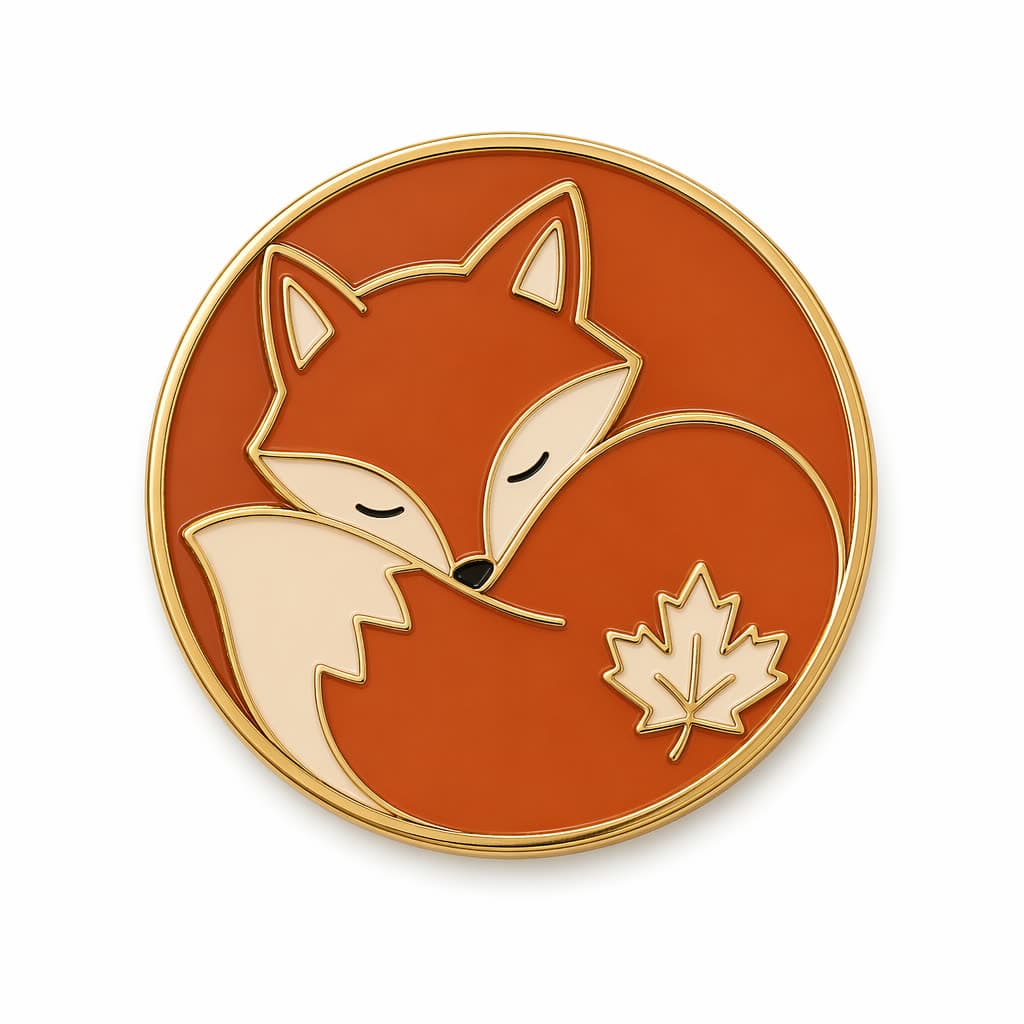
We generated this exact result by running the prompt above through GPT Image 2 on AI Pin Maker (2026-06-07) — silhouette, two-color fill, and leaf accent all landed in the first batch.
The first batch returns five directions; the crescent-curled fox wins because its silhouette reads instantly as a thumbnail and the leaf accent gives a seasonal hook. The refinement pass trims the fur tufts from many fine strokes down to three rounded shapes so the enamel wells stay above hairline width, and the booth name is set aside for the backing card rather than crammed onto the face.
A final thumbnail check confirms the eyes and leaf still register at 1-inch diameter. The vendor leaves with a single strong direction and a short note of what the production artist must vectorize, instead of ten half-finished sketches.
Match the workflow to your role
Convention vendors: compress pre-season concept work into one evening. Batch-generate booth mascots on text to image, then lay out the winners in the pin studio with size and color-count notes ready for factory quotes.
Fandom artists: explore character poses and expressions without burning commission budget on exploration. Lock the character once, then keep identity stable across a series using image to image refinement instead of fresh prompts.
Brand designers: turn an existing logo or mascot into merch without redrawing it. Upload the mark, adapt it to pin-scale production rules, and preview a launch teaser through image to video once the still passes review.
Small studios: standardize the client-facing concept stage. A versioned workspace keeps every direction comparable, and pricing scales by credits rather than seats, so occasional pin projects stay cheap.
A simple workflow
Start with a precise prompt, generate multiple directions, select the strongest silhouette, reduce unnecessary detail, check whether the design works at thumbnail size, and only then prepare a production-ready vector file. This keeps the AI stage fast without pretending it solves every manufacturing step.
FAQ
What is an AI pin maker?
An AI pin maker is a workflow that turns written briefs or reference images into pin-ready visual directions — mascot concepts, badge icons, and enamel pin mockups — in seconds rather than sketch-hours. On AI Pin Maker the same workspace carries a concept from first render through production review cues.
How does the AI pin design workflow work?
Write one precise prompt (subject, fill colors, outline, accent, no text), generate three to six variations, pick the strongest silhouette, then simplify details that break in enamel. The four-step studio flow bakes the thumbnail check and color-count review into the process.
Is AI Pin Maker free to use for pin design?
Previewing concepts is free with starter credits — no download, no sign-up needed to browse routes. Production-resolution exports and batch runs use credits; the pricing page lists packs and subscriptions by volume.
Which AI models power pin design?
Pin briefs default to GPT Image 2 for shape discipline, with Seedream 4.5, Nano Banana Pro, and the Wan image family one click away in the model router. Each route is tagged by strength so you match model to brief instead of guessing.
Who should use an AI pin maker?
Indie sellers, fandom artists, convention vendors, and small studios get the most value — anyone who needs many concepts before committing one to production. The showcase shows real concept-to-pin runs across those use cases.
When should I use text to image versus image to image for pins?
Start with text to image when the concept exists only as words. Switch to image to image the moment any render is directionally right — refinement preserves the silhouette you approved while fixing colors and details.
Why choose AI Pin Maker over a generic image generator?
Generic generators stop at a pretty render. AI Pin Maker adds the production layer: pin-scale review cues, enamel color-count discipline, mockup rendering, and a handoff brief a manufacturer can quote — the steps that decide whether a concept becomes a real object. Compare both paths free in the studio.
Explore more AI Pin Maker tools
Turn pin design intent into an AI Pin Maker action
If the idea already exists as words, generate the first concept on text to image and judge silhouettes at thumbnail size. Design the production layout in the pin studio once a direction wins.
Try image to video when the still deserves a launch teaser. Not sure where to start? Browse templates for a verified starting point.