ai headshot generator

AI Headshot Generator — From Selfie to LinkedIn-Ready Portrait

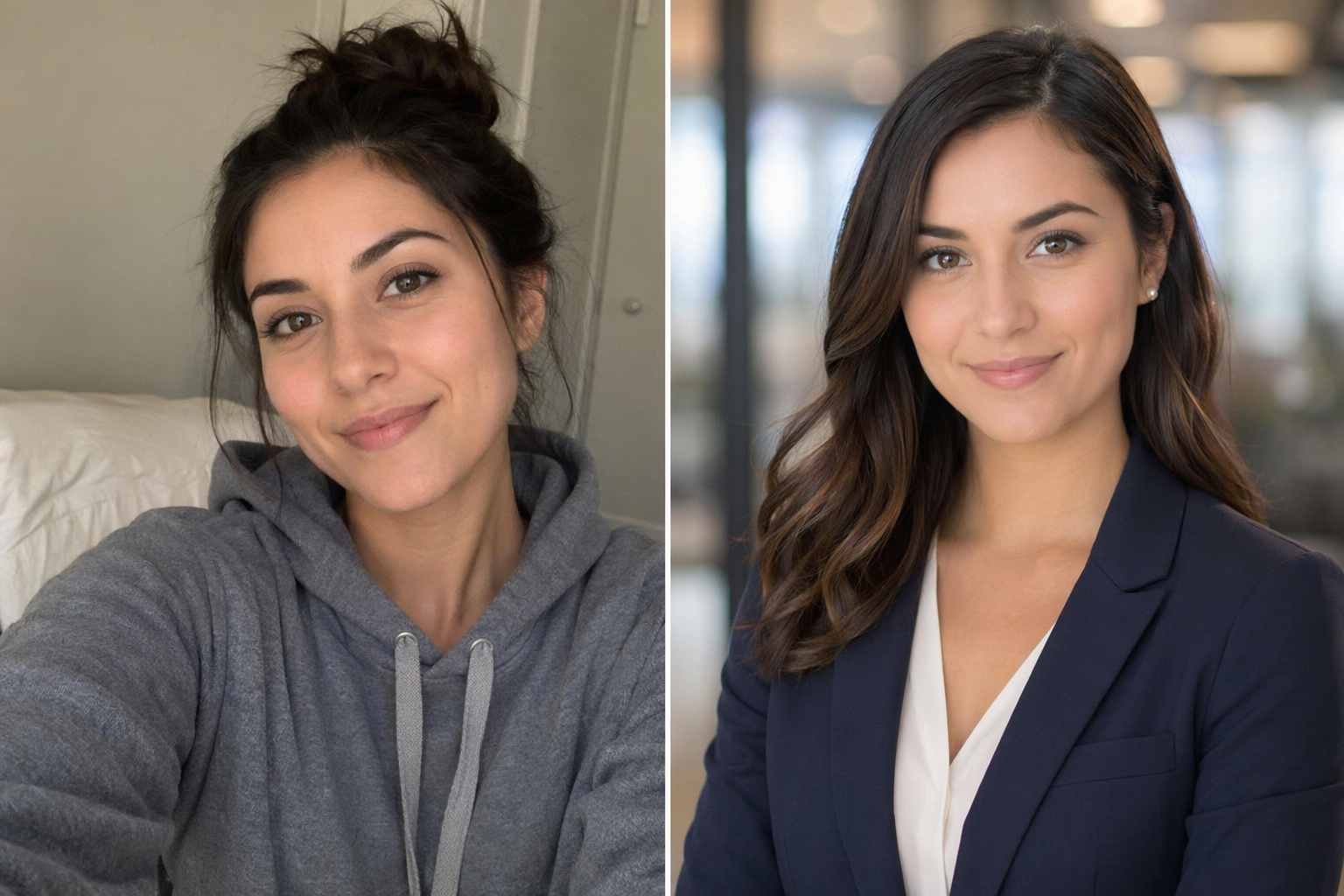
One phone selfie in, a studio-lit business portrait out — the before/after above is the whole pitch; no photographer booking required.

ai headshot generator ai headshot generator for linkedin professional headshot ai free linkedin photo generator ai business portrait maker headshot from selfie team headshots ai
AI headshot generator before and after — casual hoodie selfie transformed into a professional navy blazer portrait with studio lighting
ai headshot generator workflow preview
Start from this search

How to use ai headshot generator

Turn ai headshot generator research into a reviewed creative brief, choose the right model route, and keep the generation path attached to your project before spending credits.

Turn a casual selfie into a professional LinkedIn headshot

Get studio-quality lighting and backdrop without booking a photographer

Make consistent team headshots from everyone's mismatched photos

Find a free AI headshot trial before paying a per-photo service

Control wardrobe, backdrop and lighting style per platform

ai headshot generator workflow steps

  1. 1. Pick a source selfie: even light, neutral expression, camera at eye level, no filters.

  2. 2. Upload to image to image and prompt the four variables: light, backdrop, framing, wardrobe.

  3. 3. Generate 4-6 takes; judge by "is this recognizably me", not by polish alone.

  4. 4. Re-roll variants per destination — corporate navy for LinkedIn, softer light for the personal site.

  5. 5. Pair the winner with a matching business card layout for a coherent identity kit.

Render the first frame of this workflow in the AI Pin Maker studio — try it free, no account needed.

What a $300 studio session actually buys — and what AI replicates

A professional headshot is four controllable variables: flattering light, a clean backdrop, composed framing, and wardrobe one notch above your daily fit. All four are promptable. Upload your clearest selfie to image to image and specify the look: "professional business portrait, soft studio key light, neutral office bokeh background, navy blazer, head and shoulders, looking at camera."

The honest part: likeness fidelity is the quality bar. Source photos with even lighting and a straight-on angle preserve identity best; sunglasses, heavy filters and extreme angles degrade it. Generate several takes, pick the one that looks like you on your best day — not someone adjacent — and keep your real face in the loop for anything public-facing, per the content policy guide.

Made for

Job seekers upgrading the LinkedIn photo tonight, not after a studio's three-week booking queue — recruiters see the photo before the resume.

Founders and freelancers who need press-kit, site and proposal photos in consistent quality; one good selfie becomes a full set.

Team leads normalizing twelve mismatched employee photos into one visual standard — same backdrop, same light, every face still theirs.

Related pages

Common questions

Is the AI headshot generator free?

First previews are free with no sign-up. High-resolution exports for LinkedIn and print are on the pricing page.

What photo should I start from?

A sharp, evenly lit, front-facing selfie at eye level — no sunglasses, no heavy filter. Source quality is the single biggest factor in likeness fidelity.

Will it still look like me?

That's the bar to hold. Generate several takes in image to image and reject any that drift — the right output reads as "you, professionally photographed", not a stranger in your clothes.

What should I wear in the prompt?

One notch above your industry's daily wear: blazer over plain tee for tech, suit for finance, smart casual for creative. Solid colors photograph better than patterns.

Which AI models power the headshot generator?

GPT Image 2 and Gemini routes handle photoreal portraits; Seedream 4.5 adds a high-detail option — all switchable in the workspace.

Is it okay to use an AI headshot on LinkedIn?

Yes, when it honestly represents you — same face, current look. Platforms increasingly label AI media via metadata; treat the label as normal and keep the likeness truthful.